
Why Is My Bubble App So Slow?
You spent weeks developing your Bubble application. The design looks fantastic, the logic makes sense, and then you share it with a client or user, and their first question is, "Why is it so slow?"
You are not alone! Bubble performance concerns are one of the most often searched subjects in the no-code community, and the irritating part is that the majority of them are entirely avoidable. What is the good news? Once you know what to look for, the solutions are simple.
In this blog, we'll discuss the most common performance problems made by Bubble developers and how to fix them.
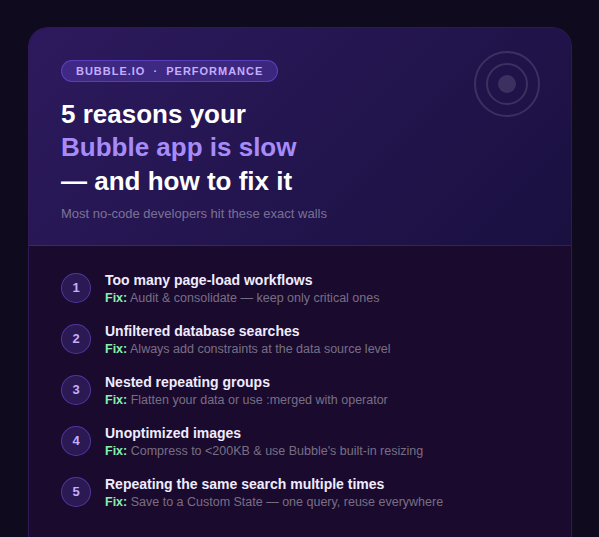
Mistake #1: Unoptimized Database Queries
Every time you type "Do a search for..." in Bubble, you make a database request. If those searches are extensive, interconnected, or repeated unnecessarily, your app will feel slow, regardless of how fast your internet connection is.
Common mistakes include:
- ◆Searching without limitations (fetching ALL data and filtering on the frontend)
- ◆Performing the same search repeatedly on the same page
- ◆Using "filtered" expressions on huge datasets instead of appropriate database restrictions
How to fix it:
- ◆Always use constraints in your search expressions. Instead of Do a search for Products and then filtering by category in a conditional, write Do a search for Products where Category = Current Page's Category. This filters at the database level much faster.
- ◆Save repeated searches to a Custom State. If you're referencing the same search in three different places on a page, store it once in a Custom State and reference that instead.
- ◆Use "count" instead of fetching full lists when you only need a number. Search for Users:count is far lighter than loading an entire list just to check how many exist.
Mistake #2: Interconnected Repeating Groups
Repeating groups are effective, but nesting them is one of the quickest ways to have your Bubble app crash. When you nest a repeating group inside another repeating group, Bubble does a database query on each row of the outer group. If the outer group contains 20 rows, it will require 20 individual queries to generate a single page.
How To Fix It:
- ◆Flatten your database structure. If you use recurring groups to present related data (e.g., Orders Line Items), consider rearranging your database to allow for a single, confined search.
- ◆Use the "Merge" operator. In some cases, you can combine two data type searches into one list using
:merged with, avoiding the need for a nested repeating group entirely. - ◆Paginate large lists. Instead of loading 100 rows at once, use Bubble's built-in List Shifter plugin or set max entries on your repeating group and implement "Load More" functionality.
Mistake #3: Multiple Workflow Triggers on Page Load
This is the number-one silent killer of Bubble app speed. When your page loads, if you have 5, 8, or even 10 workflows running at the same time — retrieving data, verifying conditions, and updating states — your app is performing all of this work before the user sees anything valuable.
Why does it happen?
Developers frequently add "When page is loaded" actions to the build process as a simple patch, and they accumulate quickly.
How To Fix It:
- ◆Audit your page load workflows by selecting the Workflow tab and filtering for "Page is loaded" events. Remove or condense anything that isn't absolutely necessary during load time.
- ◆Use "Do when condition is true" workflows instead of page-load triggers whenever possible; this way, actions are only executed when they are required.
- ◆Delay the retrieval of non-critical data. Use a Custom State to initiate a secondary data load once the critical UI has finished rendering.
Pro Tip: Use Bubble's built-in Performance Tab (in the editor's Debug mode) to monitor which workflows are under load and how long they take.
Mistake #4: Loading a Lot of Images Without Optimization
Large, unoptimised photos are a commonly overlooked performance issue with Bubble programs. A single 3MB image will slow down your page more than any other workflow issue.
How To Fix It:
- ◆Before submitting images, compress them using programs such as TinyPNG or Squoosh. Standard UI elements should use images that are less than 200KB in size.
- ◆Use Bubble's built-in image resizer. Bubble can serve a scaled version of an image in the image element attributes; activate "Resize image to fit dimensions" to avoid loading a 2000px picture into a 200px thumbnail.
- ◆Lazy load photos in recurring groups by placing them near the bottom of the cell structure or utilising conditional visibility.
Mistake #5: Use of "This Repeating Group's List" Everywhere
If you find yourself referring to RepeatingGroup X's List of Products many times on your site, stop. Every time Bubble resolves this reference, it re-evaluates the data source for the entire repeating group.
How To Fix It:
Save the list as a Custom State for the relevant group or page. Set the state when the page loads (or when the RG loads), and then use it anywhere else. One query. Multiple applications.
Quick Performance Checklist
Before you publish or share your Bubble app, run through this quick checklist:
- ◆No more than 2–3 "Page is loaded" workflows
- ◆All database searches have meaningful constraints
- ◆No repeating groups nested more than 1 level deep
- ◆Images compressed and resized appropriately
- ◆Repeated data sources saved to Custom States
- ◆Debug mode used to profile slow workflows
In a Nutshell
Bubble is an extremely powerful platform, but like any tool, how you use it is important. Most performance issues are caused by doing too much too soon — such as loading data that isn't needed yet, running overly broad searches, and repeating work that should only be done once.
Begin by auditing one page at a time. Check your load routines, restrict your search parameters, and get rid of those nested recurring groupings. You'll be astonished at how much faster your app can seem after a few targeted tweaks.
Got a specific performance issue you're dealing with? Drop it at Bubble & Beyond Contact — we'd love to help.
Want to build something like this?
We build production-ready web apps on Bubble.io. Let's talk about your idea.
Start a Project